How do I complete my yoga profile on findedeinyoga.org?
Is your yoga studio, your yoga teacher training or your retreats already listed with us?
Simply request a registration link and fill in all the important information!
The steps in detail
For instructions in the video:
1. Log in or register
Do you have your login details at hand? Then simply log in here and off you go: Log in now
Don't have your login details to hand? Request your registration link here and then set a password for your personal administration area. This will allow you to log in again and again in the future and update your information.
You can also log in again at any time directly via your entry in the portal - to do this, scroll to the end of your entry page and then click the following field. The following pop-up window will appear:

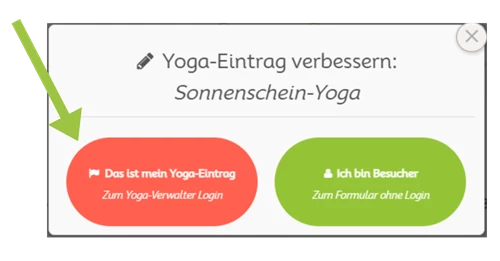
Then follow the steps displayed on the welcome page in your administration area:

2. Complete information
Give potential customers as much information as possible about your yoga offerings. This includes a short description and information about different courses, etc.

3. Upload images
To make your entry even more visually appealing, upload a few pictures and give potential customers a first impression of what your yoga studio has to offer

5. Collect reviews
Now forward the link to your listing to your existing customers and ask them to leave a review. This will help future yogis make their decision. More on reviews.
Your yoga offer is not yet listed with us?
Create your free entry here and verify your email address. We will then activate your yoga profile and you can follow the steps above using the registration link included in the welcome email.
Thank you for your contribution and have fun setting it up!
.png)